Intro
Cascading Style Sheets (CSS) is the language responsible for how a page's layout looks and behaves. It's been around for ages so it's very well-documented, and it's also very human-readable. I could show you a CSS class and you could probably figure out what it does at a glance:
                    button{

                        border: 2px solid red

}
Spoiler alert, this would add a 2-pixel-thick red border to a button.
As its name would suggest, this language's styles cascade, meaning the most recently applied style for a given element/class will take effect. Or, the style with the most specific selector. You can apply styles to elements as a whole, such as all buttons. More specifically than that, they can be applied to classes, which are essentially labels that can be applied to a number of elements. Then most specifically, you can apply styles to element IDs, which are 1-of-1.
I've used CSS in 100% of my web development projects, whether they're small practice pages or full working demos. Recently, I decided that I should learn Sassy CSS (SCSS), which is a more advanced superset of CSS. From what I'd read about it, SCSS includes improvements to the vanilla syntax that make life easier for designers.
Nesting Selectors & Stylesheet Organization
In HTML, elements can be nested within one another, creating a parent-and-child relationship between them. CSS doesn't include this in its syntax, but SCSS does. The image below is from the Sass Basics guide showing an example of a nav element with styles for its child element nested within it:
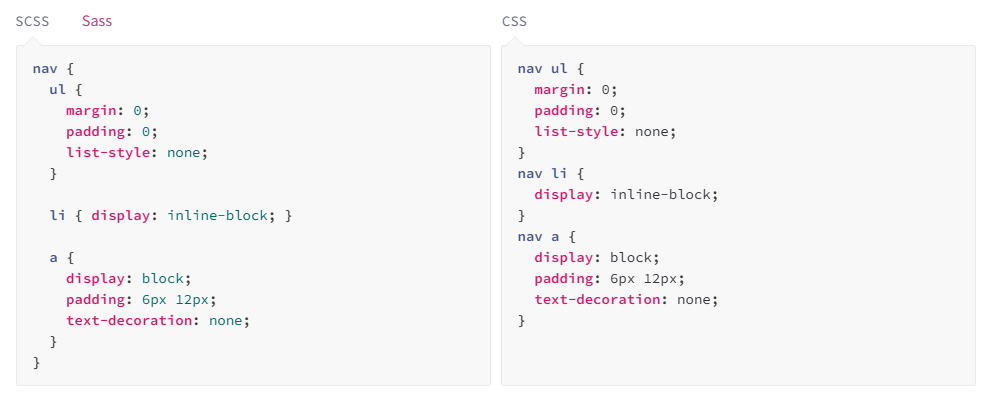
This allows for better organization of stylesheets since the designer can keep all related styles in blocks. After learning this about the language, it was easy to start piecing together just how much this changes the approach to creating styles. I have to imagine that sharing these sheets across developers now becomes far simpler; classes and styles aren't thrown all over the place.
Now consider more than one level of nested styles. In vanilla CSS, you'd be forced to create a monolith of styles that have longer names the further they are into a hierarchy. Nested styles won't reduce your number of lines by a staggering quantity, but it'll certainly improve readability and reuse.
Mixins & Reusing Code
It's incredibly common for a webpage to have a set design kit. Picture a prominent brand; something like McDonald's — it has a very clear identity with its own colors, fonts, and so on. When you design a website that adheres to a set of styles, you'll often end up repeating your CSS since the styles apply in so many places onto so many elements.
Mixins serve as templates that hold a number of styles that can be reapplied every time you reference it. If I have one hundred different classes and elements that require the same border thickness, text color, and background gradient, then I can put them all into a mixin, give it a name, and add it to those selectors. Huge reduction to code repitition.
Meet the Parents
SCSS includes a parent selector (&) in order to make pseudo-class declarations even easier than before. Similar to nesting, the pseudo-classes can be tucked into its parent element to keep code tidy. Regular CSS requires a pseudo-class to be its own selector, meaning it's always technically separate and can be placed anywhere in a stylesheet.
Pseudo-classes are how elements are styled to appear during certain "events". For instance, if you hover your mouse over a button and it changes background or font color, that's due to a :hover pseudo-class.
To me, this strikes me as something that would feel right at home in vanilla CSS and I could see it becoming automatic in my regular use. Keeping pseudo-classes close to their main class is already a regular development behavior, so lumping them all together is a natural progression. This will be an aspect of SCSS that I will use in every single project going forward.
It doesn't end there
SCSS is capable of so many more things that I didn't include here: improved variable usage, modules, calculations/operators, and more. I really just wanted to write about the ones I see myself using the most. Like anything, it'll come with practice. Use a new feature of SCSS, make it second nature, then add another feature to the arsenal, and repeat.
Definitely check out the Sass Website to read more about its ins and outs. It has thorough documentation without being so wordy that you get bored to death. Great resource.
July 30th, 2026